


HERBERT HURD
PRIMARY SCHOOL
SINCE 1954
BE JUST - FEAR NOT
ANCHORED IN EXCELLENCE
2026
DIGITAL SKILLS
One learner, one device
HERBERT HURD
PRIMARY SCHOOL
TECHNOLOGY RICH EDUCATION
Herbert Hurd Primary School actively promotes digital skills through initiatives like "Tech Week," focusing on digital citizenship and integrating technology across subjects, aiming to build essential 21st-century competencies like critical thinking and problem-solving for a technology-driven world.
At Herbert Hurd Primary School, we are committed to our responisibility to equip our learners with essential digital skills, preparing them for the challenges of the 21st century. We strive to teach learners to create content in various ways, using various applications and tools.
By embracing innovative methods, we focus on developing not only technical proficiency, but also vital soft skills that foster collaboration, creativity, and critical thinking. Our goal is to equip every child with the tools they need to thrive in a rapidly changing global landscape.
This is attained by maintaining a balance between developing digital and non-digital skills.
We aim to develop 21st Century skills in various areas of teaching-and-learning. These development of these skills are integrated in all our subjects.
Furthermore, we follow and iPad programme, Google Classroom is used in all subjects and we teach Coding in Robotics in two dedicated centres.
21st CENTURY SKILLS
Three vital 21st Century skills we seek to develop in learners are listed below.
1
LEARNING SKILLS
CRITICAL THINKING
CREATIVITY
COMMUNICATION
COLLABORATION
2
LITERACY SKILLS
INFORMATION LITERACY
MEDIA LITERACY
TECHNOLOGY LITERACY
FINANCIAL LITERACY
3
LIFE SKILLS
FLEXIBITILY
LEADERSHIP
INITIATIVE
PRODUCTIVITY
SOCIAL SKILLS
IPAD PROGRAMME
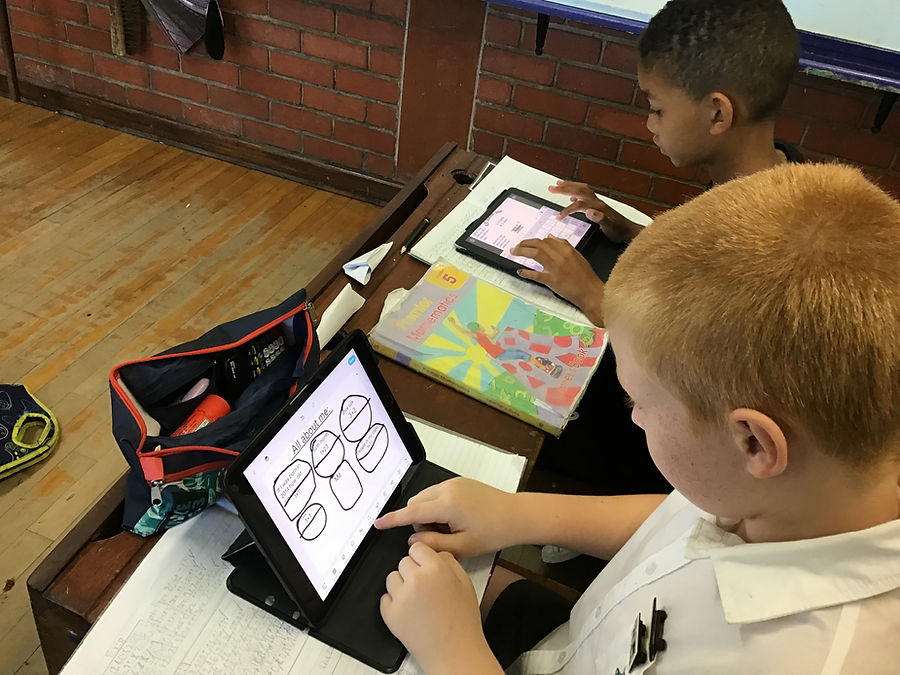
All the learners and teachers at Herbert Hurd Primary School use school iPads.
The iPad programme at Herbert Hurd Primary Schools boosts learning through personalized, interactive experiences, fostering creativity, collaboration, and essential digital skills for the future, while improving accessibility and reducing reliance on paper resources, leading to better learner engagement and outcomes. Key benefits include adaptive learning, visual storytelling tools, easy resource sharing, and built-in features for diverse needs, all supporting modern educational goals.
A cohesive iPad programme assists the learners in following a skills based approach instead of a consumer or entertainment based approach when using digital media.
In essence, iPads transform classrooms by offering a versatile, engaging platform that caters to individual needs, promotes active learning, and prepares students with crucial digital skills for the 21st century.
_HEIC.png)
_HEIC.png)
_HEIC.png)
_HEIC.png)
iPADS IN ACTION AT HERBERT HURD PRIMARY SCHOOL
Google Classroom offers major advantages like saving teachers time with centralized assignment/grading, improving organization for paperless classes, boosting communication (announcements, feedback, parent updates), enhancing collaboration with Google tools (Docs, Drive, Meet), and enabling personalized learning through easy tracking and content integration, all within a secure, accessible platform.
_HEIC.png)
CODING AND ROBOTICS IN SOUTH AFRICAN SCHOOLS
South Africa's Department of Basic Education has introduced Coding & Robotics (C&R) into the curriculum for Grades R-9 to equip learners for the 4IR.While the initiative faces challenges like infrastructure gaps (lack of computer labs in some schools), it's a significant step towards digital equity and future readiness. Herbert Hurd Primary School is fortunate to have access to Coding and Robotics content that is aligned to the CAPS Curriculum.All learners have access to IPads to create content. Herbert Hurd Primary School also has an Education Technology Centre (Grades 1 to 4) and a well-equiped Digital Skills Centre (Grades 5 to 7) for teaching Coding and Robotics.
_HEIC.png)
Four key elements are covered in teaching Coding and Robotics at Herbert Hurd Primary School.
-
Learners learn to write code in various programming languages.
-
Learners learn to design and programme robots.
-
Learners develop applications skills in applications like MS Word, MS Excel and MS PowerPoint.
-
Learners develop a digital vocabulary that is essential in a 21st Century environment.
KEY ADVANTAGES FOR LEARNERS
Preparation for Future Careers: Early exposure positions learners for growing tech-focused sectors like software development, engineering, and data science, crucial for economic competitiveness.
Enhancement of Academic Performance: Reinforces core math, science, and technology concepts, improving overall academic engagement.
Fostering Teamwork & Communication: Collaborative projects teach crucial communication, leadership, and collaborative skills as students work towards shared goals.
Building Digital Literacy & Resilience: Learners become proficient digital citizens and learn persistence through trial-and-error, a key life skill.
Addressing 4IR Demands: Aligns South Africa's education system with global technological advancements, ensuring learners aren't left behind in the digital age.